
Pre-grading
Pre-grade your card before you pay to grade it.
Cardinal pre-grades a trading card from your phone: it scores centering, corners, edges and surface separately, shows the magnified crop behind each score, and tells you whether the card is worth sending to PSA, BGS, CGC, SGC or TAG after the fee. It is free and needs no account.
What it reads
The four things a grader scores, read one at a time.
A grade is not one impression of a card. Grading companies score the same four attributes, and the lowest one usually caps the result. Cardinal reads each of them on its own.
Corners
Edges
Surface
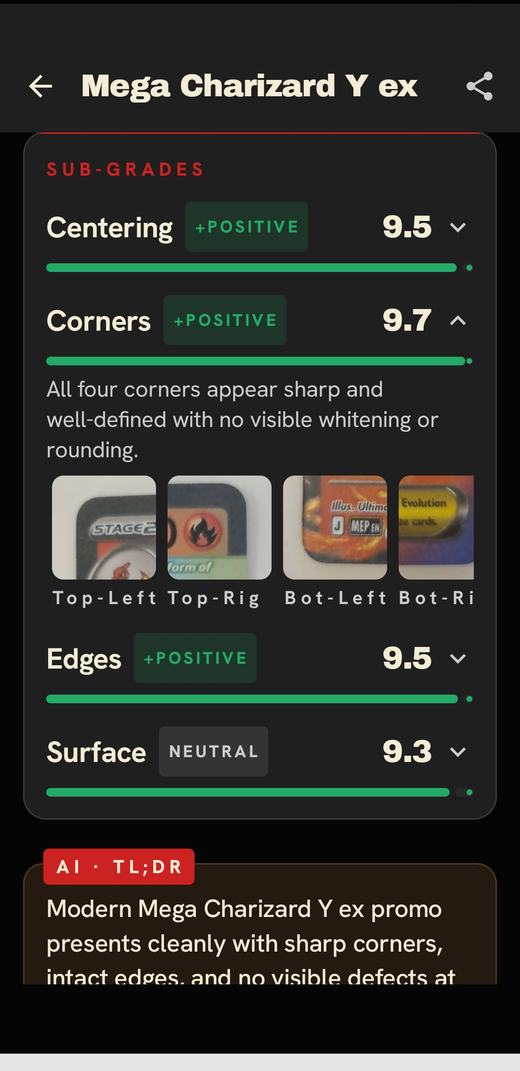
Evidence, not a verdict
Every score comes with the crop it was read from.
If Cardinal calls the bottom-left corner soft, the bottom-left corner is right there next to the number. You can look at it and decide whether you agree. That is the point: a pre-grade you can check, rather than a number you have to trust.
The same card scanned twice gets the same grade, so a re-scan is a check, not a re-roll.
How to use it
A pre-grade in under a minute.
- Scan the card. Cardinal identifies it on the device — game, set, number and printing — and puts the live raw and graded prices next to it.
- Run the pre-grade. A short multi-angle sweep reads centering, corners, edges and surface, and returns four subgrades with their crops and a predicted overall grade.
- Read the verdict. Cardinal compares the card's raw value with what it is likely to be worth graded, subtracts each grader's fee, and tells you whether grading pays — and with which company.
- Decide. Submit it, sell it raw, or keep it. Already slabbed? Scan the label to see what that grade is worth.
Limits
What a pre-grade can't tell you.
A pre-grade is an informed read, not the grading company's decision. Graders handle the card in hand under controlled light, and two graders can disagree by a point on the same card. Treat Cardinal's result as a filter: it tells you which cards are worth the fee and which are not, and shows you why.
Cardinal does not authenticate cards or detect counterfeits.
Not sure whether a card clears the bar? Work out whether it's worth grading.
Questions
Pre-grading, answered.
What is pre-grading a card?
Pre-grading is checking a card's condition before you pay to have it professionally graded — the same four attributes a grading company scores (centering, corners, edges and surface) — so you only submit the cards likely to come back high enough to pay for the fee.
Can an app tell me what grade my card will get?
It can give you an informed read, not a guarantee. Cardinal scores each of the four attributes separately and shows the magnified crop behind each score, so you can check its reasoning. The grading company's graders make the final call with the card in hand.
Which grading companies does Cardinal cover?
PSA, BGS, CGC, SGC, TAG. Cardinal prices each grade for each company and compares them after fees.
Which cards does Cardinal work with?
Pokémon, Magic: The Gathering, Yu-Gi-Oh!, Lorcana and sports cards, identified from a catalog of 7.67M cards.
Is Cardinal free?
Yes. Cardinal is free on iPhone and Android and does not require an account.
Know the grade before the envelope.
Free on iPhone and Android. No account.